
Lesson Outcome:
Explain how inline caches optimize property access and what coding patterns invalidate them.
In our previous lesson, we demystified V8's hidden classes, revealing how the engine creates internal "blueprints" for your objects to enable fast property access. You now understand that the order of property initialization is not just a style choice—it's a critical performance factor that determines an object's shape.
This lesson addresses the logical next question: How does V8 actually use these hidden class blueprints to make your code execute at near-native speed? The answer lies in a mechanism called Inline Caching (ICs). We will explore how V8 creates tiny, specialized caches at the exact points in your code where properties are accessed, and crucially, what coding patterns can "pollute" these caches, leading to the performance cliffs that often mystify developers.
Why This Matters at a Senior Level
[Often asked]
A senior engineer's responsibility extends beyond writing functionally correct code; it includes writing code that performs well under pressure. When a critical data processing function or rendering loop is mysteriously slow, the root cause is often not a complex algorithmic flaw but a "megamorphic call site" that prevents JIT optimization. Being able to articulate that "this function is slow because it's being fed multiple object shapes, which pollutes the inline cache and forces V8 into a slow, generic lookup path" is a sign of true seniority. It shows you understand the deep interplay between your code and the runtime engine, a skill that is essential for building and debugging high-scale systems.
Core Concepts: From Blueprint to Shortcut
In the last lesson, we established that objects with the same property initialization order share the same hidden class. This is the foundation. Inline Caching is the mechanism that builds upon this foundation to achieve speed.
To understand ICs, we first need to define a call site: it's a specific location in your source code where an operation, like accessing a property, occurs.
function getUsername(user) {
  return user.name; // This line is a single, unique call site for the '.name' access.
}

const userA = { id: 1, name: 'Alice' };
const userB = { id: 2, name: 'Bob' };

getUsername(userA); // Execution hits the call site.
getUsername(userB); // Execution hits the *same* call site again.
V8 optimizes at the call site level. Think of an Inline Cache as V8's "targeted muscle memory" for a specific call site.
Video 1
This talk by Michael Stanton, a V8 engineer, provides a fantastic analogy for how an IC works. He describes it as a 'recipe' that the engine learns.
Guidance 3mins
Watch the segment from , where he explains the initial slow path and the subsequent fast path using a cached 'recipe'. Then, continue from , which illustrates the internal check an IC performs.
As the video explains, the first time getUsername(userA) is called, the IC at return user.name is "uninitialized." V8 has to do a slow lookup:
- Find the hidden class of
userA. - Search that hidden class's metadata to find the memory offset for the property
name. - Go to that memory offset and retrieve the value.
After doing this work, the IC "learns." It caches the hidden class of userA and the offset for name. The next time getUsername(userB) is called, the IC performs a single, lightning-fast check: "Does userB have the same hidden class as userA?" Since it does, the IC completely skips the slow lookup and uses the cached offset. A dynamic property access has just become as fast as a direct memory read in C++.
The States of an Inline Cache
This ideal scenario is called a monomorphic state (mono = one), because the call site has only ever seen one object shape. But what happens when it sees more? This leads to the different states an IC can be in.
Video 2
This freeCodeCamp Talks video gives a clear, concise explanation of how dynamic types lead to different IC states and the performance implications.
Guidance 3 mins
First, watch the segment from Javascript dynamic nature to understand how different shapes force V8 to de-optimize. Then, watch the summary of the IC states from Monomorphic, Polymorphic, Megamorphic .
As explained in the video, an IC can transition through several states:
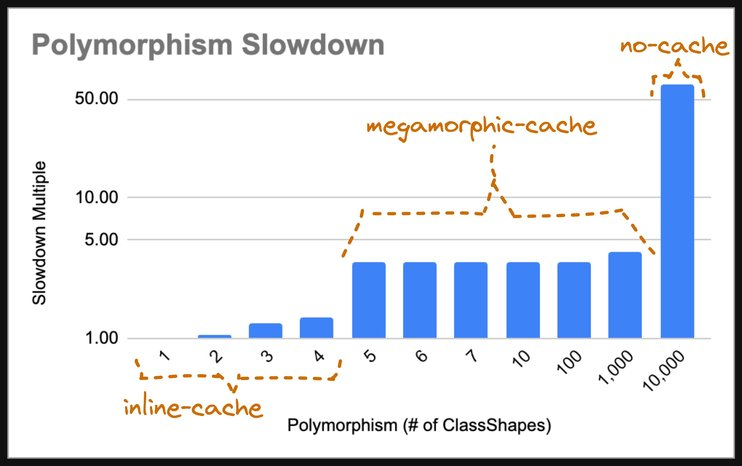
- Monomorphic: The call site has seen only one hidden class. This is the fastest state. V8 can generate hyper-optimized machine code assuming this single shape.
- Polymorphic: The call site has seen a small number of different hidden classes (typically 2-4). This is slower. V8 must add checks: "Is it shape A? Use offset X. Is it shape B? Use offset Y."
- Megamorphic: The call site has seen too many different hidden classes. V8 gives up on optimizing this specific site. It falls back to the generic, slow lookup method every time. Performance plummets.
This performance cliff is not theoretical. The following chart visualizes the dramatic slowdown as a call site transitions from monomorphic to megamorphic.
Coding Patterns That Invalidate Inline Caches
The most important takeaway is to understand what actions cause an IC to become polymorphic or megamorphic. The goal is to write code that keeps call sites in a monomorphic state, especially in performance-critical "hot paths."
Reading 1
This article provides excellent, practical "BAD" vs. "GOOD" code examples that show exactly what patterns to avoid.
Guidance 10 minutes
First, read the sections explaining each IC state to solidify the concepts. Then, carefully study the code examples under IC optimization strategies. Pay close attention to the three main culprits: inconsistent shapes from conditional properties, different property order, and using delete.
https://www.mintlify.com/renderffx/raw-bits-to-react/js-engine/jit-optimization
To summarize the key invalidation patterns:
- Conditional property addition: Adding a property inside an
ifblock creates two different hidden classes.
// BAD: Creates two shapes, making consumers of these objects polymorphic.
function createRequest(body) {
  const req = { body };
  if (body.token) {
    req.authenticated = true; // This line creates a second shape!
  }
  return req;
}
- Inconsistent property order: As we learned in the last lesson, this creates different hidden classes even with the same properties.
// BAD: user1 and user2 have different shapes.
const user1 = { name: 'Alice', id: 1 };
const user2 = { id: 2, name: 'Bob' };
- Using
delete: Thedeletekeyword forces a shape transition and often puts the object into a slow "dictionary mode" that can never be optimized with ICs again. - Polymorphic functions: Writing a single utility function designed to handle many different kinds of objects is a direct path to a megamorphic call site.
// BAD: This function's `entity.id` access will become megamorphic.
function processEntity(entity) {
  // Receives User objects, Product objects, Order objects...
  console.log('Processing ID:', entity.id);
}
The fix is often to split the function into multiple, monomorphic helpers.
// GOOD: Each function is monomorphic and will be highly optimized.
function processUser(user) {
    console.log('Processing User ID:', user.id);
}
function processProduct(product) {
    console.log('Processing Product ID:', product.id);
}
Mental Model: The Specialist vs. The Generalist
Imagine a highly efficient assembly line for building cars.
- Monomorphic (The Specialist): You have a worker at a station who only ever installs the steering wheel for a single car model, say, a "Model J". They develop perfect muscle memory. They don't need to think; they grab the wheel and bolt it on in milliseconds. This is a monomorphic inline cache.
- Polymorphic (The Competent Generalist): Now, the factory starts producing a "Model S" as well. The worker is given a small checklist: "If it's a Model J, use the three-spoke wheel. If it's a Model S, use the yoke." They have to pause and check the blueprint each time, which is slightly slower, but manageable. This is a polymorphic IC.
- Megamorphic (The Overwhelmed Intern): The factory goes crazy and starts producing 50 different models. The worker is handed a massive, 300-page binder. For every car that comes down the line, they have to stop, look up the model number in the index, find the correct page, read the complex instructions, and then find the right part from a huge bin. The entire assembly line grinds to a halt. This is a megamorphic IC.
Your job as a performance-conscious engineer is to design your "data factory" to use as many specialists and as few overwhelmed interns as possible.
Common Misconceptions
- Myth: "My function is slow, I need a better algorithm."
Reality: Often, the algorithm is fine. The performance issue is at the data-access level. A single, megamorphic call site inside a loop (
for (const item of items) { console.log(item.id) }) can be orders of magnitude slower than any algorithmic inefficiency, especially ifitemscontains objects of many different shapes. - Myth: "Polymorphism is always bad and should be avoided." Reality: Polymorphism is a natural part of object-oriented and dynamic programming. V8 is specifically designed to handle it up to a certain degree (the polymorphic state). The goal is not to eliminate it entirely, but to ensure that performance-critical hot paths remain monomorphic.
- Myth: "Inline caches are a type of memory cache like a CPU L1 cache." Reality: While the name is similar, the mechanism is different. An IC is not a general-purpose data cache. It's a highly specific code-patching technique that rewrites a small stub of machine code at a specific call site to create a fast path for a particular object shape.
Senior Insight
A senior engineer proactively designs data structures for monomorphism. When designing an API that returns a list of items, they will ensure every object in the array has the exact same set of properties, in the same order, even if it means adding propertyName: null for objects where that property isn't relevant. They understand that the tiny cost of a few extra null bytes in a JSON payload is trivial compared to the massive cost of deoptimizing a client-side rendering loop that processes that data thousands of times per second. They see data shapes not just as containers for information, but as instructions to the JavaScript engine on how to optimize.
Production War Story
A team was building a feature-flag-driven UI. A central function, renderComponent(user, componentConfig), was responsible for rendering various UI components. Different feature flags, active A/B tests, and user permissions would slightly alter the user object.
// Simplified example
function renderComponent(user, config) {
    // ...
    const canPerformAction = user.permissions.includes(config.requiredPermission); // Call site A
    // ...
}

// In one part of the app:
const user1 = { name: 'Alice', permissions: ['read'] };
renderComponent(user1, config);

// For an A/B test group, an extra property was added:
const user2 = { name: 'Bob', permissions: ['read', 'write'], experimentGroup: 'A' };
renderComponent(user2, config);

// For admins, another property:
const user3 = { name: 'Charlie', permissions: ['*'], role: 'admin' };
renderComponent(user3, config);
The team noticed that as they added more feature flags and user variations, the entire UI became sluggish. Profiling revealed that the user.permissions access inside renderComponent was consuming a huge amount of CPU time. The call site had become megamorphic. It was seeing dozens of slightly different user shapes, forcing V8 to abandon optimization.
The fix was to standardize the user object shape at the authentication layer, before it ever reached the UI code. A User class was created that initialized all possible properties to null.
class User {
  constructor({ name, permissions, experimentGroup, role }) {
    this.name = name;
    this.permissions = permissions || [];
    this.experimentGroup = experimentGroup || null;
    this.role = role || 'guest';
  }
}
By ensuring that every part of the application received a User object with the same, stable shape, the inline cache at the critical call site became monomorphic again, and performance was restored.
Conclusion
You have now connected the "what" (Hidden Classes) with the "how" (Inline Caching). You understand that V8's incredible performance isn't magic; it's a result of making optimistic assumptions based on the code it sees and creating specialized, fast-path shortcuts at specific call sites.
Key Takeaways:
- ICs are Call-Site Specific: V8 creates an Inline Cache at each point in your code where a property is accessed.
- Monomorphic is Gold: A call site that sees only one object shape is monomorphic and the fastest.
- Polymorphic is Okay: A call site that sees 2-4 shapes is polymorphic and slower, but still optimized.
- Megamorphic is a Performance Cliff: A call site that sees many shapes becomes megamorphic, and V8 gives up, resulting in a massive slowdown.
- Write Predictable Code: To keep your code fast, ensure that objects passed to functions in hot paths have a consistent shape. Initialize all properties, maintain property order, and avoid
delete. Split polymorphic functions into monomorphic helpers.
We've now explored how V8 allocates memory for objects (Heap), organizes it for speed (Hidden Classes), and accesses it quickly (Inline Caches). The final piece of the memory puzzle is understanding how V8 reclaims memory that is no longer needed. In the next lesson, we will dive into Garbage Collection, exploring the "mark-and-sweep" algorithm and how V8's generational collector efficiently manages memory across an application's lifecycle.




Comments
…
Loading comments…